Deposit Assets

Bring your assets into Rujira

Deposit from supported chains and start using your assets across the Rujira ecosystem. Move between products, trade across chains, and withdraw whenever you want while staying in control of your wallet.

Rujira deposit interface showing supported assets and wallet balances

Deposit Flow

How depositing works

Depositing is designed to feel simple and familiar. Connect one or more wallets, choose the asset you want to deposit, enter the amount, and confirm the route before sending funds to Rujira.

1

Connect the wallets you want to use

Start with a Rujira-compatible wallet, then add a secondary wallet if your assets are held somewhere else. This lets Rujira detect funds across wallets and chains so you can move assets from another wallet or network into Rujira.

3

Enter the amount and choose the chain

Select how much you want to deposit and choose the source chain when multiple routes are available. Rujira clearly shows fees, estimated received amounts, and deposit details before you confirm.

Deposit USDCto Rujira

Select Source Account

USDC
0$ 0,00
Minimum Deposit
0,001000 USDC
Swap Fee
0,000000 USDC ($ 0,00)
Received Amount
0 USDC ($ 0,00)
Destination
4

Optional: choose the asset version you want to deposit

By default, Rujira converts assets like USDC to the Ethereum version because it is the most widely used version across the platform and the one most people choose to deposit into Rujira products. If you prefer to keep the original chain version, you can use Advanced Options to keep the asset connected to networks like BNB Chain, Base, or Avalanche.

Deposit USDCto Rujira

Select Source Account

USDC
0$ 0,00
Minimum Deposit
0,001000 USDC
Swap Fee
0,000000 USDC ($ 0,00)
Received Amount
0 USDC ($ 0,00)
Destination
thor1uu48rykx2dpatdhk335fc6ms7xyxmq7ph0hlgrthor1uu48r....7ph0hlgr

Deposit in Seconds

Add assets whenever you need them

Rujira makes depositing simple. Add native assets at any time from the header, or start directly from a product when you need funds to complete an action.

Add assets to your Rujira wallet anytime from the top right corner. The guided deposit flow helps you move funds in quickly so you can start using products without confusion.

If you need more funds while using a product, Rujira guides you directly into the deposit flow so you can continue without leaving the experience.

Deposit when you are ready and start using omnichain DeFi with full control of your assets.

Start depositing

Withdrawals

Move your assets whenever you want

Depositing into Rujira should never lock you in.

You can move native assets across chains, use them throughout the Rujira ecosystem, and withdraw them back to your wallet whenever you choose.

Withdrawals are simple and handled directly from your portfolio. Select the asset, choose the destination, and confirm the transaction from your wallet.

No bridges. No wrapped assets. Just transparent omnichain finance built on THORChain.

Wallet Support

Use the wallets that already hold your assets

You do not need to move everything into one wallet before getting started. Connect the wallets you already use, choose the asset you want to deposit, and Rujira guides you through the correct route.

Keplr and Vultisig provide the most complete Rujira experience today, while additional supported wallets can still be used for deposits, withdrawals, and cross chain activity.

Scroll sideways to compare wallet support across chains.

Wallet route availability by source chain
WalletRujiraBTCETHBNBBaseAVAXATOMXRPTRONTONLTCDOGEBCH
VultisigRecommendedDesktopAvailableAvailableAvailableAvailableAvailableAvailableAvailableAvailableAvailableAvailableAvailableAvailableAvailable
KeplrRecommendedMobileAvailableAvailableAvailableAvailableAvailableAvailableAvailable
Trust WalletAvailableAvailableAvailableAvailableAvailableAvailableAvailableAvailableAvailable
OKX WalletAvailableAvailableAvailableAvailableAvailableAvailable
BraveAvailableAvailableAvailableAvailable
Coinbase WalletAvailableAvailableAvailableAvailable
MetaMaskAvailableAvailableAvailableAvailable
Rabby WalletAvailableAvailableAvailableAvailable
TronLinkAvailableAvailableAvailable
TonkeeperAvailable
XamanAvailable

Omnichain Deposits

Deposit from many chains. Use everything in one place.

Rujira is built for omnichain finance. Deposit supported assets from different blockchains, access native asset DeFi from one app, and move liquidity freely without bridges or wrapped tokens.

Your assets stay connected to a transparent system designed around accessibility, flexibility, and self custody.

Secured Assets

Deposit with confidence

Before you deposit, you should know exactly how your assets are protected.

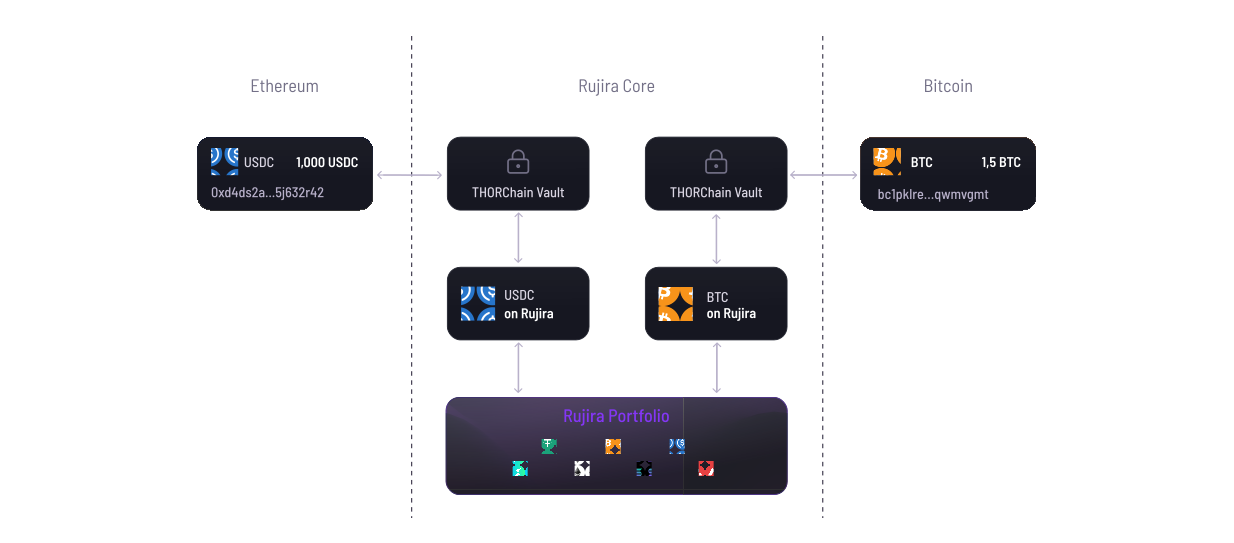
Rujira’s Secured Assets system explains how supported assets are secured, how custody works, and how you stay in control while using omnichain DeFi with native assets.

Built on THORChain infrastructure, Rujira gives you transparent protection without bridges or wrapped tokens.

Secured Assets illustration

FAQ

Deposit questions, answered

Clear answers before you move assets into Rujira.

Why can't I find my asset?

Rujira can accept deposits directly from these supported chains:

  • Rujira
  • Bitcoin
  • Ethereum
  • BNB Chain
  • Base
  • Avalanche
  • Cosmos Hub
  • XRP Ledger
  • TRON
  • TON
  • Litecoin
  • Dogecoin
  • Bitcoin Cash

If your asset is on another chain, such as Arbitrum, you can't deposit it directly yet. First move it to a supported asset on a supported chain, then return to Rujira and deposit it normally.

For example, if you have USDC on Arbitrum, you can move it to USDC on Ethereum using CCTP or a cross-chain service such as Rango or KyberSwap. These are third-party services, so review their fees, routes, and risks before using them. Rujira does not endorse or guarantee them.

How do I deposit assets to Rujira?

Open Deposit from the top-right corner of the app or from your Portfolio.

Choose the asset you want to deposit, select where it is coming from, enter the amount, and review the details before confirming. If an asset is available on multiple chains, Rujira shows the supported options available to you.

Some deposits include a swap to the version used across Rujira. Any conversion, expected fees, and amount received are shown before you confirm.

How do I deposit from a centralized exchange?

Select Deposit from an exchange in the deposit flow and choose the asset you want to send. Rujira will show the deposit details you need.

On your exchange, start a withdrawal and make sure you select the same asset and network shown by Rujira. Always check the network and address before confirming. Sending an asset over the wrong network may result in lost funds.

If your exchange cannot send the required asset or network directly to Rujira, withdraw to your own wallet first and deposit from there. You can also view the deposit guide for a step-by-step walkthrough.

Why is my deposit failing?

A deposit requires a transaction on the blockchain your asset is coming from. You need enough of that chain's fee asset in your wallet to pay the network fee.

For example, if you deposit USDC from Ethereum, you need some ETH in the same wallet to pay the fee. If you deposit ETH itself, leave enough ETH in your wallet to cover the fee instead of depositing your full balance.

For some tokens, your wallet may also ask you to approve the token before depositing. Approval is a separate transaction and may require its own network fee.

My asset is supported, but my wallet isn't. What can I do?

Connect another wallet that supports the chain and asset you want to deposit. Some wallets can be used for deposits even if they do not support every Rujira feature.

See the supported wallet and chain matrix to compare the available routes.

Manual deposits are coming soon. They will let you deposit from a wallet that isn't connected to Rujira by sending the transaction yourself.

Which version of an asset should I deposit?

Some assets, such as USDC, are available on several blockchains. When more than one supported version is available, Rujira shows which chains you can deposit from.

By default, Rujira may swap a non-canonical version to the version used across its products. When direct deposit is supported, you can open Advanced Options and choose to keep the original chain version instead.

Any conversion, expected fees, and amount received are shown before you confirm.

Are there any deposit fees?

You normally pay the network fee for the blockchain you're depositing from.

If your deposit includes a swap to another version of the asset, there may also be a swap fee. Rujira shows the expected fees and amount received before you confirm when that information is available.

Network fee: The fee paid to the blockchain for processing your transaction.

How long does a deposit take?

Deposit times depend on the blockchain you're sending from and current network conditions. Your deposit must be confirmed on the source blockchain before it can be completed on Rujira. Some chains confirm faster than others.

If you have already sent the transaction, avoid sending it again while the first deposit is still being processed.

Can I deposit EUR or USD?

Yes. You can use Banxa to buy crypto with currencies such as EUR or USD through Rujira. Select the fiat deposit option and follow the steps provided by Banxa.

Availability, payment methods, fees, and identity checks may vary by country. Additional on-ramp and off-ramp providers are planned.

Keep Learning

Explore the deposit path

Depositing connects wallets, chains, asset protection, and the wider Rujira app. These pages are the best next steps.

Or look for the full overview in our Support and Learn section.

Open Support